Welcome to ScapeCrunch

We are ScapeCrunch, the place where planted aquarium hobbyists come to build relationships and support each other. When you're tired of doom scrolling, you've found your home here.

PAR meter using iPhone / Android APP - does it work?

  • Thread starter Thread starter Yugang
  • Start date Start date
  • Tagged users Tagged users None
This would explain my failure using it lol. I tried putting my iPhone in a plastic baggie and doing underwater tests. It failed miserably and I cursed paying $6 I can’t get back šŸ˜‚

Star Wars Dummy GIF by MOODMAN
 
Thanks to everyone who contributed to this.
In the frustration of trying to nail down what is going on with my tank, I have paid to rent a company's PAR meter. It should be here next week. I came to the forum to ask a couple questions so I could be prepared for the meter and not squander the expense. I found all my answers already here. I wish I had come here first, but you know how it is when you're really frustrated. In the future, if I need to change things, I'll just use the Photone app as described above.
 
@BenB , since you are renting it anyway, why not get the app as well and check it against the (presumably) accurate meter, as some others have done and reported in this thread?
It’s always good to have more verification.
 
@BenB , since you are renting it anyway, why not get the app as well and check it against the (presumably) accurate meter, as some others have done and reported in this thread?
It’s always good to have more verification.
Oohhhhh... that's an amazing idea! šŸ”„
I need to figure out that diffuser paper thing that was mentioned. I don't think it applied to Android phones, but I need to be ready. I don't want to waste time while I have it.

Anyone else have any ideas like this while I'm at it?
 
I need to figure out that diffuser paper thing that was mentioned. I don't think it applied to Android phones
The diffuser paper is very important, for iPhones.
The reason they are not needed for Android, if I understand correctly, is that Android phones are assumed to work with a separate light intensity detector that basically already includes the functionality of the diffuser.
 
Android phones are assumed to work with a separate light intensity detector

This app will tell you if your model phone has the light intensity sensor šŸ‘

If you have a Samsung Galaxy phone, dial *#0*# in the phone app, tap the 'Sensor' button, then tap the 'Light sensor' button and you can see your light measured in Lux.

(To then escape out of the Sensor mode šŸ™„ tap the back arrow twice)
 
Last edited:
The reason they are not needed for Android, if I understand correctly, is that Android phones are assumed to work with a separate light intensity detector that basically already includes the functionality of the diffuser.
OK. I didn't know if that could change with newer models or anything though.

This app will tell you if your model phone has the light intensity sensor šŸ‘

If you have a Samsung Galaxy phone, dial *#0*# in the phone app, tap the 'Sensor' button, then tap the 'Light sensor' button and you can see your light measured in Lux.

(To then escape out of the Sensor mode šŸ™„ tap the back arrow twice)
I couldn't get that to work. It says improper MIMI code.

I downloaded the app and it didn't say anything about difuser paper, etc.
I have realized the plants are going to be an issue for me to get everything down to substrate level. I'm sure I can get the PAR meter sensor down in a few places, but not a whole Galaxy. At this point, I'm about read to trash it all and start over anyway. :mad:😁 I thought I was making a little progress, but I'm not sure. The green water is better but the other algae is full steam ahead. I'm playing with my fert levels though.
I didn't have to pay for the app, but there are some pro functions I don't have without paying. I'm not sure if I need them. ePAR and "advanced reading" are two of them. @Yugang any idea if I need this? Thanks.
 
I didn't have to pay for the app, but there are some pro functions I don't have without paying. I'm not sure if I need them. ePAR and "advanced reading" are two of them. @Yugang any idea if I need this?
I used my app only once, and since then never again as the data will not change over time . So I looked back as I had forgotten, but no I have not bought the pro functions.
 
Hey everyone, I’m using the Photone PAR meter on my iPhone 15 Pro along with their diffuser and the Full spectrum LED source. My tank is 45cm tall and the light is suspended 11ā€ above the water line. One of the nice things about my setup is that I can easily swing the lights out of the way and take PAR readings in air.

Here’s what I’m seeing:
  • In air: ~120 µmol/m²/s at the surface, ~60 at the substrate
  • Underwater (using a Pelican waterproof pouch): also ~120 at the surface and ~60 at the bottom
I expected some reduction in PAR readings underwater due to refraction or absorption—even with clear water—but the numbers are basically the same. Am I missing something here? Is this typical for such a short water column with clean water, or could something else be effecting the results?

If this is legit, it’s kind of great that I can just take quick PAR readings in air without always going underwater. But I wanted to sanity check this with others—any thoughts or similar experiences?
 
Hey everyone, I’m using the Photone PAR meter on my iPhone 15 Pro along with their diffuser and the Full spectrum LED source. My tank is 45cm tall and the light is suspended 11ā€ above the water line. One of the nice things about my setup is that I can easily swing the lights out of the way and take PAR readings in air.

Here’s what I’m seeing:
  • In air: ~120 µmol/m²/s at the surface, ~60 at the substrate
  • Underwater (using a Pelican waterproof pouch): also ~120 at the surface and ~60 at the bottom
I expected some reduction in PAR readings underwater due to refraction or absorption—even with clear water—but the numbers are basically the same. Am I missing something here? Is this typical for such a short water column with clean water, or could something else be effecting the results?

If this is legit, it’s kind of great that I can just take quick PAR readings in air without always going underwater. But I wanted to sanity check this with others—any thoughts or similar experiences?
Did you follow their underwater guide like I mentioned above? I agree seems weird open air gives the same reading as submerged
 
Did you follow their underwater guide like I mentioned above? I agree seems weird open air gives the same reading as submerged
I did. It states to test the meter under a strong light source without and with the bag. If the two results are similar there is no need for calibration. Mine read 150 and 147. So that to me is similar and i did not do calibration.
 
Hey everyone, I’m using the Photone PAR meter on my iPhone 15 Pro along with their diffuser and the Full spectrum LED source. My tank is 45cm tall and the light is suspended 11ā€ above the water line. One of the nice things about my setup is that I can easily swing the lights out of the way and take PAR readings in air.

Here’s what I’m seeing:
  • In air: ~120 µmol/m²/s at the surface, ~60 at the substrate
  • Underwater (using a Pelican waterproof pouch): also ~120 at the surface and ~60 at the bottom
I expected some reduction in PAR readings underwater due to refraction or absorption—even with clear water—but the numbers are basically the same. Am I missing something here? Is this typical for such a short water column with clean water, or could something else be effecting the results?

If this is legit, it’s kind of great that I can just take quick PAR readings in air without always going underwater. But I wanted to sanity check this with others—any thoughts or similar experiences?
When light strikes water perpendicular, due to refractive index difference, it reflects only a few percent and nearly all goes into the water. So this could be within your margin of error for the measurement. For non perpendicular light rays, reflection could be much more.

So generally you must measure with water, and depending on the configuration of your measurement, a measurement without water may be a little or much off.
 
Last edited:
I get the PAR meter tomorrow. It is an Apogee MQ-510 for underwater use. I have it for 5 days, but I also have work, chores, life, etc.... so I'm trying to be proactive about having any potential problems taken care of.

1. Earlier in this thread there was discussion of a conversion table, but I don't think that ended up being a thing. Is that correct?
2. I still need to do the "bag calibration."
3. Do I need to pay the extra and get the ePAR (extended PAR) for this to be more accurate, or is the basic fine? (Photone App)
4. The sensor for the PAR meter looks to be ~1" high Do I need to push it down into the substrate a little to make it similar in height to my phone for it to be more accurate? I'm thinking, yes.

Anything else?
 
Comparison of Photone App with Apogee MQ-510
Light
Chihiros WRGB II Pro

Tank
ADA 60p
14.25ā€ tall
Distance of light from top of substrate ~16ā€

PAR Meter
Apogee MQ-510
Rented from Pod My Reef

20250710_094147a.webp

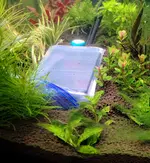
I tested multiple light settings because I was curious. I wanted to see what the Photone App would do, and I wanted to know the results of some past settings and some of the stock settings. The meter sensor was sunk into the substrate as an attempt to be at the same level as the phone camera.

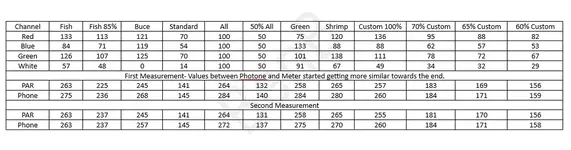
In the pic below, you’ll see that I tested everything twice. At the beginning, many of my readings between the app and the meter were far apart, but by the end of the first round and all the second round of testing, they are much more similar. I have described what I think happened below the image. It’s important info for anyone considering using the Photone App.
Data Table.webp
When I put my phone in the water, I had a bit of a bubble over the camera sensor that I couldn’t squeeze out or push to a different spot. I hoped it wouldn’t cause any problems. I also had a few bubbles come up from somewhere. I hoped it was air trapped in the crease of the bag and not air leaving the inside of the bag allowing water to enter with my phone.

When I started the measuring, there was a decent difference between PAR meter and Photone. I assumed there would be some, but this was more than expected.

As I got close to finishing, I noticed that the numbers were closer together. I assumed possibly the app wasn’t as accurate in brighter light as lower light. However, for someone reason I decided to re-test and this time they were mostly all closer. So I re-tested everything. I thought maybe the phone took time to settle down or some other unknown reason.

As I removed my phone from the water, I noticed there was a bit of water in the bag and the bubble over the phone sensor was gone.

So I’ve concluded, unscientifically, that the bubble caused the initial issues. It makes sense since my readings improved as more water would have entered the bag, the air came out, and the bubble compressed.

Note some of the larger discrepancies in the measurements come when the green channel dominated.

Tips for People who Want to Try the Photone App
It can be tricky to read your phone screen when it is 8 inches away, under water, sitting on your aquarium substrate.

If you want to test multiple light settings, it is a pain when the phone you adjust the light with is also the phone sitting under water. If the app icons for your light and Photone are on different screens it’s even worse. You have to take your phone out of the water, swipe to the correct screen, change your light settings, swipe back to Photone, put phone in the water. All this while trying not to stir up dust on the substrate. Install your light control app on a tablet or different phone and adjust the light with that while the phone you’re using as the sensor stays in the water.

Turn off the auto screen brightness. It doesn’t help to try to look through the water at your phone screen over on the substrate to find that your screen shifted to dark for some reason. This was a bit of a variable. Sometimes it didn’t.

Change your display settings so that the screen stays on and does not go off in the middle of testing.

The Photone app didn’t initially indicate that I needed a filter but just as I was ready to start, it changed its mind and naturally, I didn’t have the right kind of paper. So, get some 22lb printer paper before you start. (note I had the correct paper by the time of my tests)

You need to calibrate your phone for the plastic bag. There is a tutorial in the app. It’s a bit vague.

The values on both the meter and the app changed rapidly over a small range while testing. Maybe ripples in the water or something caused it. At some point I just picked the number I saw most often.

Addendum
I mentioned above how the app and meter readings would cycle rapidly over a range of about 8-10 which made reading difficult. I said I eventually usually just had to pick the number I saw the most or was in the middle. I suggested ripples in the water were causing it. However, today before I put the meter back in the mail, I adjusted my light to new lower settings, turned my filter off, and tested my PAR with only the meter. It still cycled through a range of numbers.

Conclusion
After I had time to think about my post, I had a few things I wanted to add.
1. The air bubble thing is something you need to take care of, but I probably devoted much too much space too it relative to its importance.
2. Where the results were just a few points off between meter and app, honestly the numbers kept cycling back and forth so much, it’s just as likely they matched.
3. In the end, I didn’t emphasize enough that, I found the Photone App to be close enough to the PAR Meter that given a bit of prep with your phone, you should be able to use it with strong confidence in your results.
 
Last edited:
Great measurement work @BenB , this has been a lot of work and is very helpful as a reference.

At the beginning, many of my readings between the app and the meter were far apart, but by the end of the first round and all the second round of testing, they are much more similar
I'd prefer to look at the differences between PAR meter and Phone as a percentage. Your first measurements, not yet optimally executed, were better than 10% accuracy. Follow up measurements, while continuing to learn, were mostly within 5%. This I regard an amazing result.

When doing measurements in science a tricky question is what accuracy is needed, and what accuracy the measurement technique will bring.

If I were a commercial plantgrower in a large greenhouse with artificial lighting, I would like to optimise my light settings for the best economy of my green house. Too much light would be a waste of electricity, too little would limit my production or quality of product. I'd invest in a good PAR meter so that I can measure with 5% accuracy or better. The PAR meter will earn itself back, no problem.

So for our aquaria, what is really the required accuracy we need? 5%, 10 or perhaps 20%? Also, as per a previous post, the light intensity may vary a lot with the position in the tank.

My personal take is that the photone app is more than accurate enough for hobby aquarium use, and arguably even for professionals.
 
Last edited:
Did you find this was true both directly under the light, ie at midline, and at an angle as at the front and back glass? šŸ¤”
No because.....
1. I forgot 😁
2. The tank has is full of plants, so even getting the phone and the PAR meter together as in the pic was a challenge. This was the only place the phone would fit on the substrate, and that is because I moved plants around the weekend before and left this hole for just this purpose. Just to get this, I had to lay heavy scissors across my Blyxa japonica to hold it back and not shade the sensors of both. So I wouldn't have been able to anyway. I supposed I could have laid the phone on top of some of the plants, but then it would have leaned sideways and it would have been difficult to align it to the same angle as the PAR meter sensor.
3. I did slide the light at one point so that that the center was a few inches from the sensors. My thought was to simulate what the PAR would be where at the foreground and not just directly under the center. (Moved the light and not the sensors) I guess this would have been an angle reading. The reading were similar, but I quickly realized I couldn't do this for all of the different settings I wanted to try, so exactly how similar is getting fuzzy in my head. I moved the light back pretty quick and didn't write anything down. I don't remember them being way off though. I can't attest to any conclusion.
 
Did you find this was true both directly under the light, ie at midline, and at an angle as at the front and back glass? šŸ¤”
It's a valid point. If we would really want to fully compare we would have to test its angular dependence, as well as spectral dependence.

I concur that the angular dependence may be the more relevant of the two, as a piece of paper is less sophisticated than a well tested optical diffuser. Having said that, the optical diffuser can be bought from Photone for anyone interested in more accuracy and repeatability.

While we may split hairs and challenge the Photone app, the critical observer may ask why can we assume that the Apogee produces the perfect reference data? How has the Apogee been calibrated, and why would we assume that is the gold standard in itself? Perhaps an Apogee is calibrated against another Apogee, and does that calibration take all angles and spectrum into account?

So again, I believe for our hobby the photone is more than good enough, if proper diffuser used and carefully measured.
 

Top 10 Trending Threads

Back
Top