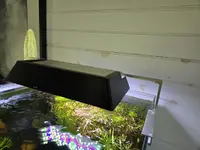
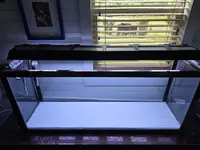
I'm seeking some advice on how I can keep one of my tanks lit for high tech specs while also not having to turn it off during work hours. I'm a therapist and do video calls 4+ hours a day, but the lighting on the tank to my right behind me is so bright you can't even see into my (presently quite overgrown) aquarium. Nobody has complained about the brightness bothering them in a sensory way, but I'm not convinced that they're not just trying to be polite, as I work with a lot of folks with sensory sensitivities.
Right now I turn it off during work hours and split the photoperiod to before and after my sessions, but I'd like to be able to see in my tank while I'm in my office. I tried seeing if there is a film I could apply to the front/side glass to reduce the light coming out of the tank to a more reasonable level, like in a tinted car window. There appears to be film for windows that block UV light, or you can get an opaque film to block the view altogether, but that's not what I need either.
Can anyone recommend settings on my lamp (Fluval 3.0) or my webcam that might be less disruptive while also letting me keep demanding plants? Or a product that might change how it shows up on camera? It looks reasonable in person but on screen its an eyesore. Worst case scenario, I turn it into my long-planned all Crypt tank and go lower tech, but I'd planned on doing it in a 10 gallon, not this smaller one (I think it's a 7G, if it matters).
Thanks!
Right now I turn it off during work hours and split the photoperiod to before and after my sessions, but I'd like to be able to see in my tank while I'm in my office. I tried seeing if there is a film I could apply to the front/side glass to reduce the light coming out of the tank to a more reasonable level, like in a tinted car window. There appears to be film for windows that block UV light, or you can get an opaque film to block the view altogether, but that's not what I need either.
Can anyone recommend settings on my lamp (Fluval 3.0) or my webcam that might be less disruptive while also letting me keep demanding plants? Or a product that might change how it shows up on camera? It looks reasonable in person but on screen its an eyesore. Worst case scenario, I turn it into my long-planned all Crypt tank and go lower tech, but I'd planned on doing it in a 10 gallon, not this smaller one (I think it's a 7G, if it matters).
Thanks!