


We have had many members ask for the ability to capture snapshots of their tanks over time. This makes a ton of sense and would be a good addition to our Journals that capture a running diary of what's going on with the tank.
Use case: You want to take a picture/video of your aquarium on a specific date and capture things about it such as the equipment and/or tank parameters. You want to be able to do this every few months so you can see the changes/evolution easily. You also just want the ability to capture your living work of art at particular moments over a long period of time.
How to do it:
1. Create a Media Album for your aquarium.
Click on the Media tab in the site's main navigation bar. This is how it looks like on a desktop.

Then, select the category called "Member Showcase".
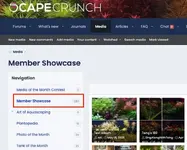
Now, click on the "Create Album" button to create your album.

Give your new album a title and description. You need to upload at least one media item. Then click on save.
2. Add media to your new album.
Once your new album is created, you can add media to it whenever you want. Just go back to your album and click on the "Add media" button.

When you upload a media album, it will present you with the ability to fill in a bunch of fields that allow you to give information on the aquarium at that time. For example, let's say you added new lights, change the fertilizer and started adding CO2. You can note all of that in these fields and create a record for you to remember and reference in the future.
The information will display in an extra information box when you select the media item.

3. Link to your album from your Journal thread.
If you created a Journal thread for your aquarium, you can embed either the album or individual images from your album into any post you create. For example, you may want to create a sticky post in your Journal thread (it will appear as post #1) that contains a link to that aquarium's album. Or, you may want to make a post with that day's current photo and embed the media item from your album.
It's easy to do. When you want to create a link over to your media album, just click on the Gallery embed button in your post toolbar.

This will cause a pop-up showing your options to embed.

And there you have it. You now can pick and choose what images get into your curated, personal media album.
With great power comes great responsibility! Let's use these creatively and share best practices with our fellow community members!
Use case: You want to take a picture/video of your aquarium on a specific date and capture things about it such as the equipment and/or tank parameters. You want to be able to do this every few months so you can see the changes/evolution easily. You also just want the ability to capture your living work of art at particular moments over a long period of time.
How to do it:
1. Create a Media Album for your aquarium.
Click on the Media tab in the site's main navigation bar. This is how it looks like on a desktop.
Then, select the category called "Member Showcase".
Now, click on the "Create Album" button to create your album.
Give your new album a title and description. You need to upload at least one media item. Then click on save.
2. Add media to your new album.
Once your new album is created, you can add media to it whenever you want. Just go back to your album and click on the "Add media" button.
When you upload a media album, it will present you with the ability to fill in a bunch of fields that allow you to give information on the aquarium at that time. For example, let's say you added new lights, change the fertilizer and started adding CO2. You can note all of that in these fields and create a record for you to remember and reference in the future.
The information will display in an extra information box when you select the media item.
3. Link to your album from your Journal thread.
If you created a Journal thread for your aquarium, you can embed either the album or individual images from your album into any post you create. For example, you may want to create a sticky post in your Journal thread (it will appear as post #1) that contains a link to that aquarium's album. Or, you may want to make a post with that day's current photo and embed the media item from your album.
It's easy to do. When you want to create a link over to your media album, just click on the Gallery embed button in your post toolbar.
This will cause a pop-up showing your options to embed.
And there you have it. You now can pick and choose what images get into your curated, personal media album.
With great power comes great responsibility! Let's use these creatively and share best practices with our fellow community members!


